Ratings & Reviews performance provides an overview of what users think of your app. Here are the key metrics to help you identify how your app is rated by users and how successful is your review management strategy.
 4.3
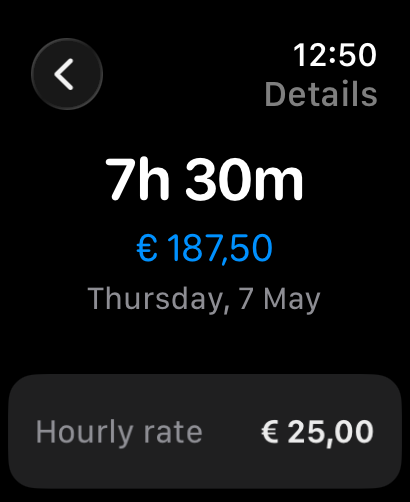
4.3Track your work hours, overtime, and earnings in one simple app. Work Counter is the hours tracker that gives you a clear overview of every shift, project, and pay period, whether you work hourly, freelance, or full time. Whether you are a freelancer, contractor, or employee, this time tracking app always gives you a clear overview of your work hours, projects, and salary. Clock in with one tap or add hours manually. Set different hourly rates per project or weekday, and let overtime pay be calculated automatically. With Work Counter, time tracking becomes simple and reliable: view clear summaries, follow your progress with charts, and export your timesheet to PDF, CSV, or Excel for invoicing, payroll, accounting, or tax purposes. For every freelancer, contractor, and employee, this is the all-in-one solution for professional time tracking and complete hours tracking. Features - Quick clock in & out for instant time tracking - Automatic clock in & out based on your work location - Automatic rounding when you clock out to the nearest interval you set - Apple Watch app to clock in, view stats, and track hours from your wrist - Also available as a native Mac app with full dashboard, history, and export - Add hours manually for missed entries - Automatic overtime calculation in your timesheets - Invoice generator with your logo, company details, and hourly breakdown - Track travel expenses per trip or project - Set different hourly rates per day, project, or task - Link time entries to projects, tasks, locations, and people - Add notes to your time registrations - Pay cycles to track unpaid hours per project - Daily reminder to log your hours at a time and on days you choose - Overview per project, task, person, or total - Charts and statistics for better insight into your work hours and earnings - Editable history to easily correct your time tracking - Live Activity on Lock Screen and Dynamic Island - Siri shortcuts to clock in, check hours, or add entries by voice - Home screen widgets with heatmap calendar and bar chart overview - Export to PDF, CSV, and Excel for invoicing, payroll, or accounting - iCloud sync across iPhone, Mac, and Apple Watch Work your way With Work Counter, you stay in control of your hours. Set your own hourly rates per project, task, or client, or split your tracked time per customer. Whether you are a freelancer, contractor, or employee, this time tracker adapts to your workflow. Customize the app to your preferences: choose your theme, configure your dashboard, and decide which tools support your time tracking. Whether you manage multiple projects at once, need a reliable hours tracker for client invoicing, or want a clear overview for your payroll, salary, or accounting, Work Counter grows with you. Whether you are a freelancer tracking billable hours, a shift worker logging overtime, a gig worker managing multiple jobs, a temp keeping a timecard, or an employee who wants a clear work log, Work Counter has you covered. Record your work hours, manage your projects, and keep everything organized for payroll, invoicing, and accounting. Stay in control of your time and your earnings.