Ratings & Reviews performance provides an overview of what users think of your app. Here are the key metrics to help you identify how your app is rated by users and how successful is your review management strategy.
 3.0
3.0
User reviews affect conversion to installs and app rating. Featured and helpful reviews are the first to be noticed by users and in case of no response can affect download rate.
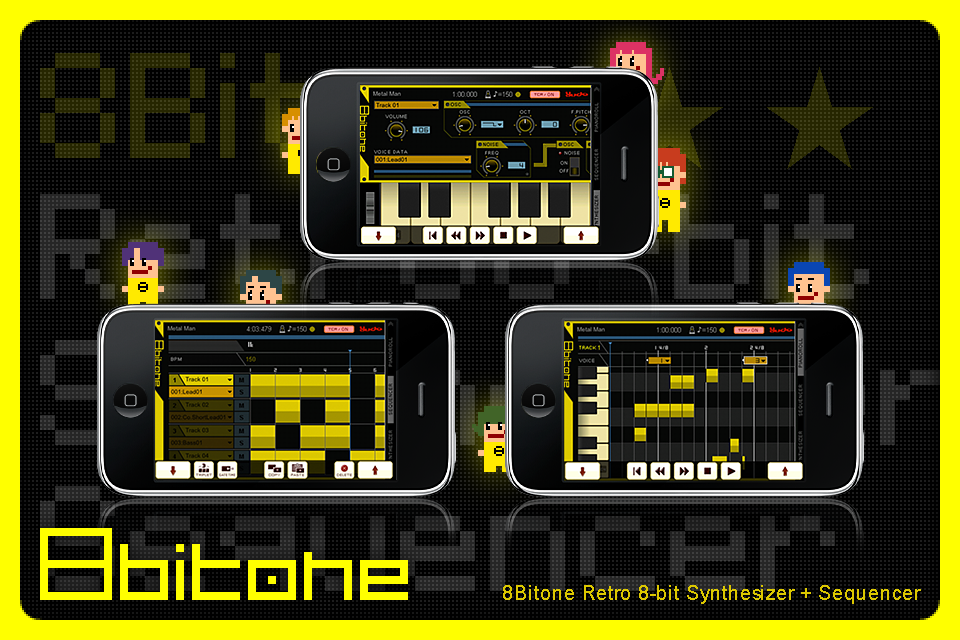
■2.0.0 You can Upload and Download to server And, post to Twitter. 8Bitone is Synthesizer and Sequencer application to simulate sounds for 8bit Personal Computer and Console Game Generator from the 80`s. PSG and SSG vintage voices are revived here and their nostalgic electric sounds are able to be simulated with iPhone/iPodTouch. The Sequencer part uses general Piano Roll Screen. It has been adjusted for Multi-Touch function of iPhone/iPodTouch to compose songs with fingertip easily. To operate Sound Changer properly, Synthesizer parts consist simple form of Knobs, Switchs, Sliders for easy understanding. You can find the most suitable to learn the basic device of the synthesizer here. >> Synthesizer Monophonic 1 oscillator or LowBitNoise. LFO Envelope HiSpeed Arpeggiator >> Sequencer Edit With Truck manager on Sequencer screen, Composing is easy with Piano Roll format. In addition, Voice Change is equipped to produce different Voices in the song. 4 trucks are the maximum limit. >> Voice Edit The nostalgic sounds can be created here by turing knobs and operating sliders on Synthesizer screen. In 8Bitone, a group of values which are set on the Synthesizer screen is called “VOICE”. Each one song can contains up to 128 Voices. In addition, playing with keyboard on the bottom of the screen can be enjoyable too. Move the wheel to control the Pitch. >> Edit Controller Edit Controller on the screen right side will show 3 types of monitor. Selection is operated by touching each of the monitor`s name. >> Transcontroller PLAY, STOP, COPY, PASTE, DELETE function for songs are performed in the Transcontroller. In 8Bitone, Transcontroller will be turned on with TCR button of the screen upper part.